How to Reverse Calculate Sales Tax
A complete step-by-step guide to finding the original price and tax amount hidden inside any tax-inclusive total.
If you’re wondering how to reverse calculate sales tax, you’re in the right place. Whether you’re a business owner, accountant, freelancer, or shopper, knowing how to reverse calculate sales tax helps you determine the original price of an item before tax was added. Instead of adding tax to a subtotal, reverse tax calculation works backward to separate the tax amount from a tax-inclusive total.
Many people struggle with reverse sales tax calculations because they only know how to add tax, not remove it. Fortunately, the process is simple once you understand the formula. In this guide, you’ll learn how to reverse calculate sales tax with easy formulas, real-life examples, common mistakes to avoid, and practical applications.
Want to skip the manual math?
🔢 Try the Reverse Tax CalculatorWhat Is Reverse Sales Tax?
Reverse sales tax is the process of finding the original price of a product or service before sales tax was included in the final amount. Instead of calculating how much tax to add, you remove the tax from the total price.
For example, if you purchased an item for $108 and know that the sales tax rate is 8%, reverse calculation helps determine that the item’s original price was $100, while $8 was the tax.
Understanding how to reverse calculate sales tax is especially useful when invoices, receipts, or purchase records show only the final tax-inclusive amount.
Why Is Reverse Tax Calculation Important?
There are many situations where reverse sales tax calculations are necessary.
Businesses
Use it to prepare accurate financial statements and bookkeeping records.
Accountants
Use it to separate taxable revenue from collected taxes.
Freelancers
Use it when clients send tax-inclusive payments.
Consumers
Use it to understand the actual cost of products before tax.
E-commerce sellers also rely on reverse calculations when marketplaces display tax-inclusive prices.
Reverse Sales Tax Formula
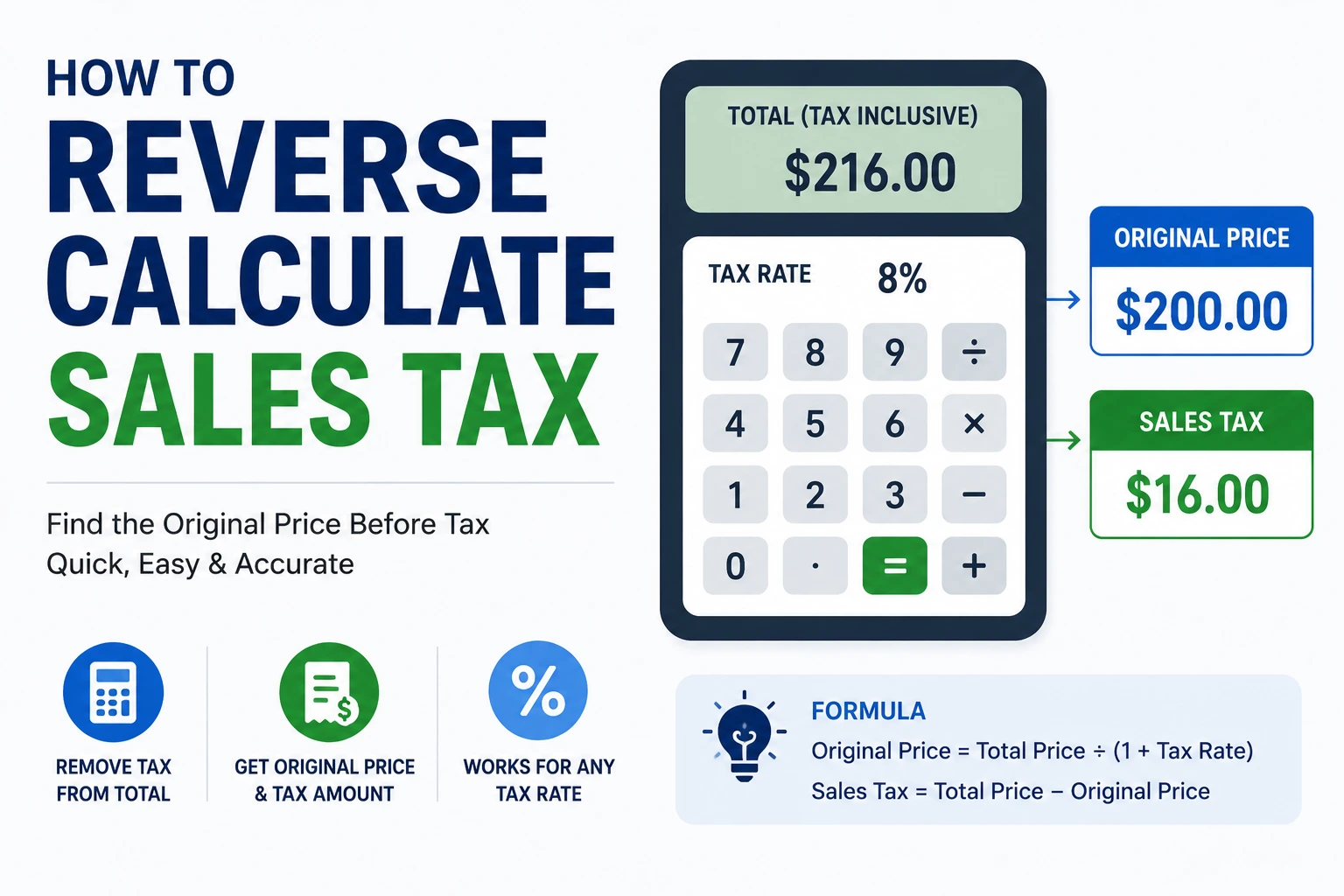
The standard formula is simple, and once you see it laid out with a worked example, it becomes second nature.

Step-by-Step Example
Let’s calculate another example. Suppose your receipt shows a total paid of $535 at a 7% sales tax rate.
Convert to decimal
7% becomes 0.07
Add 1
1 + 0.07 = 1.07
Divide the total
$535 ÷ 1.07 = $500
Subtract to find tax
$535 − $500 = $35
Original Price: $500. Sales Tax: $35. This is exactly how to reverse calculate sales tax without guessing.
Common Sales Tax Rates
Keep this table handy whenever you need to perform a quick reverse calculation.
| Tax Rate | Divide Total By |
|---|---|
| 5% | 1.05 |
| 6% | 1.06 |
| 7% | 1.07 |
| 8% | 1.08 |
| 10% | 1.10 |
| 15% | 1.15 |
| 20% | 1.20 |
When Should You Reverse Calculate Sales Tax?
Knowing how to reverse calculate sales tax is beneficial in many real-world situations. You may need it when:
- Reviewing tax-inclusive invoices
- Preparing accounting records
- Filing business taxes
- Auditing financial transactions
- Comparing product prices
- Checking supplier invoices
- Verifying online purchases
- Calculating taxable income
Businesses often perform hundreds of reverse tax calculations every month.
Back Out Tax Calculator & Reverse Tools
Instead of manually performing calculations every time, many businesses prefer using a back out tax calculator. These tools instantly separate the original price from the tax amount, reducing the chance of calculation errors. This is particularly helpful when working with different tax rates or processing a large number of transactions.
A sales tax calculator reverse tool automates the entire process. Simply enter the total amount and sales tax percentage, and it instantly provides:
- Original price
- Tax amount
- Total before tax
- Total tax collected
This saves time while improving accuracy for businesses, accountants, and online sellers.
Common Mistakes to Avoid
Many people make simple mistakes when removing sales tax. Avoid these common errors:
- Subtracting the tax percentage directly from the total
- Forgetting to convert percentages into decimals
- Dividing by the tax rate instead of adding one first
- Using the wrong local sales tax rate
- Rounding too early during calculations
Double-checking your calculations ensures accurate financial records, especially when the same total is used across multiple invoices or reports.
Reverse Sales Tax vs Adding Sales Tax
Although both calculations involve the same tax rate, they serve different purposes.
| Reverse Sales Tax | Adding Sales Tax |
|---|---|
| Removes tax from total | Adds tax to subtotal |
| Finds original price | Finds final selling price |
| Used for bookkeeping | Used during checkout |
| Starts with total price | Starts with pre-tax price |
Understanding reverse sales tax helps you confidently work with tax-inclusive pricing.
Benefits of Using an Online Calculator
Manual calculations work well for occasional use, but online calculators offer several advantages. They are:
- Faster
- More accurate
- Beginner-friendly
- Free to use
- Suitable for businesses
- Compatible with any tax rate
If you frequently calculate taxes, using an online calculator can save valuable time. If you also work in digital marketing or advertising, the Cost Per Impression Calculator is worth bookmarking alongside your financial calculators for tracking campaign performance.
Ready to find the original price hidden in any tax-inclusive total?
🔢 Try the Reverse Tax CalculatorConclusion
Understanding how to reverse calculate sales tax is an essential skill for businesses, accountants, freelancers, and consumers. By using the correct formula, you can quickly determine the original price before tax and accurately identify the tax amount included in any total.
Whether you’re reviewing invoices, preparing tax reports, or checking receipts, mastering how to reverse calculate sales tax helps improve financial accuracy and saves valuable time. For the quickest and most reliable results, use the Reverse Tax Calculator whenever you need to calculate reverse sales tax in just a few seconds.